
Written by:
Editorial Team
Editorial Team
A dynamic resource scheduler is a system that automatically allocates computing resources—such as CPU, memory, and storage—to applications based on their real-time needs. It acts like an air traffic controller for a cloud environment, continuously adjusting resource distribution to handle shifting application demands. The objective is to maximize application performance while minimizing wasted resources and associated costs.
The Shift From Static to Dynamic Resource Scheduling
Traditionally, deploying a server for a new project involved static allocation. This method required estimating the maximum resources an application might ever need and dedicating them exclusively to that workload. This manual approach often led to one of two outcomes: over-provisioning, where organizations paid for unused capacity, or under-provisioning, which caused applications to fail during unexpected demand spikes.
A dynamic resource scheduler replaces this static model. Instead of pre-assigning fixed resources, it creates a flexible pool of resources that are distributed on demand. This adaptability is necessary for managing the unpredictable workloads common in AI, machine learning, and modern enterprise applications.

Why Old Methods Fall Short
Static scheduling was sufficient when applications were monolithic and their usage patterns were predictable. Modern applications, however, operate differently.
- Volatile Demand: An e-commerce platform may experience a 10x traffic increase during a flash sale. An AI model might require a large cluster of GPUs for a 12-hour training period and then sit idle.
- Microservices Architecture: Systems are now often composed of dozens of independent services, each with its own fluctuating resource requirements.
- Cost Pressure: In a cloud environment, every idle CPU cycle represents a direct cost. Without automated controls, cloud expenditures can grow unexpectedly.
These challenges demonstrate that a fixed allocation approach is no longer effective. A dynamic scheduler fits into the broader domain of resource management by providing the automation and intelligence required to address these issues.
The Core Principle of Dynamic Scheduling
The central concept of dynamic scheduling is continuous optimization. A scheduler constantly monitors the status of available resources and the requirements of all workloads, both running and queued. It then makes immediate, data-informed decisions to ensure each workload receives the precise resources it needs at the moment it needs them.
A dynamic scheduler changes resource allocation from a manual, estimation-based task into an automated, data-driven process. It aims to achieve operational efficiency by aligning resource supply with workload demand.
This automated approach is a primary driver of market growth. The dynamic scheduling software market was valued at approximately USD 3.85 billion in 2023 and is projected to reach USD 12.45 billion by 2033, according to a DataHorizzon Research report. This expansion is fueled by organizations migrating to the cloud to increase operational capacity. By moving away from manual configurations, these companies are building more resilient, cost-effective, and powerful systems.
Static vs Dynamic Resource Scheduling at a Glance
A side-by-side comparison highlights the differences between the two methodologies. The static approach is ill-suited for the demands of modern computing.
| Attribute | Static Scheduling (Legacy Method) | Dynamic Scheduling (Modern Method) |
|---|---|---|
| Resource Allocation | Fixed and pre-assigned based on peak estimates. | Fluid and allocated in real-time based on actual demand. |
| Efficiency | Often inefficient; leads to wasted resources or performance bottlenecks. | Highly efficient; resources are utilized only when and where needed. |
| Cost Model | Pay for peak capacity, even when idle (over-provisioning). | Pay only for consumed resources, reducing cloud spend. |
| Scalability | Manual and slow; requires human intervention to adjust capacity. | Automated and instantaneous; scales with the workload. |
| Workload Suitability | Best for predictable, stable workloads with consistent needs. | Essential for volatile, unpredictable workloads like AI/ML and microservices. |
| Management Overhead | High. Requires constant manual monitoring and adjustment. | Low. The system self-optimizes, freeing up engineering teams. |
While static scheduling was once practical, dynamic scheduling is the necessary approach for organizations focused on performance and cost control in cloud environments.
The Business Impact of Dynamic Scheduling
The primary value of a dynamic resource scheduler is its effect on business operations. Transitioning from fixed resource allocations to an automated system impacts financial performance, operational agility, and team productivity. This is a strategic business decision, not merely a technical adjustment.
The most direct benefit is a reduction in cloud expenditures. In a static model, teams provision for worst-case scenarios, allocating resources for peak demand that may occur infrequently. The rest of the time, that capacity remains idle but still incurs costs. A dynamic scheduler eliminates this waste by matching resource allocation to real-time needs.
Based on DSG.AI's analysis of customer implementations, this optimization typically leads to a 15-30% reduction in cloud spend for managed workloads. This turns a major operational expense into a source of capital for other initiatives.
Freeing Up Your Most Valuable Resource
Dynamic scheduling also impacts personnel. Manually monitoring workloads and adjusting resource allocations consumes significant time from skilled engineers. This process is not only slow but also prone to human error.
Automating resource management returns time to engineering teams. Instead of addressing performance issues or adjusting configurations, they can focus on developing products and features. This shift produces several key improvements:
- Faster Application Deployment: With self-managing infrastructure, teams can release code and updates more quickly.
- Improved Developer Productivity: Engineers are relieved of routine infrastructure tasks, allowing them to concentrate on higher-value work.
- Reduced Manual Errors: Automation eliminates common configuration mistakes that can cause downtime or security vulnerabilities.
Ensuring Business Continuity and Customer Satisfaction
A dynamic resource scheduler helps meet Service Level Agreements (SLAs). By reacting instantly to workload changes, it ensures applications have the resources to perform reliably, even during sudden traffic surges. This prevents the slowdowns and outages that erode customer trust.
Consistent performance leads to higher customer satisfaction and retention. When services operate reliably, the user experience improves, which strengthens brand reputation and protects revenue.
A dynamic scheduler functions as an insurance policy against poor performance. It helps ensure applications remain responsive, which is critical for customer retention and meeting contractual obligations.
The benefits extend beyond technology companies. According to a 2023 market analysis by DataHorizzon Research, dynamic schedulers in manufacturing can reduce equipment downtime by up to 30%. In healthcare, they can improve patient throughput by as much as 25%. More broadly, enterprises adopting this type of workload automation can see operational costs fall by 20% and reduce manual errors by 40-50%. You can explore more of these dynamic scheduling software findings to see the wide-ranging impact.
Implementing a dynamic resource scheduler is a business decision that enhances financial efficiency, increases team productivity, and improves customer relationships by delivering a consistently reliable service.
How Different Scheduling Algorithms Work
The effectiveness of a dynamic resource scheduler is determined by its algorithm—the logic it uses for decision-making. Schedulers can employ a range of algorithms, from simple rule-based systems to more complex machine learning models that adapt over time.
Selecting a scheduler with an algorithm appropriate for your specific workloads—whether predictable batch jobs or volatile AI training—is key to achieving desired outcomes. A well-chosen scheduler can produce measurable gains in cost efficiency, productivity, and system reliability.
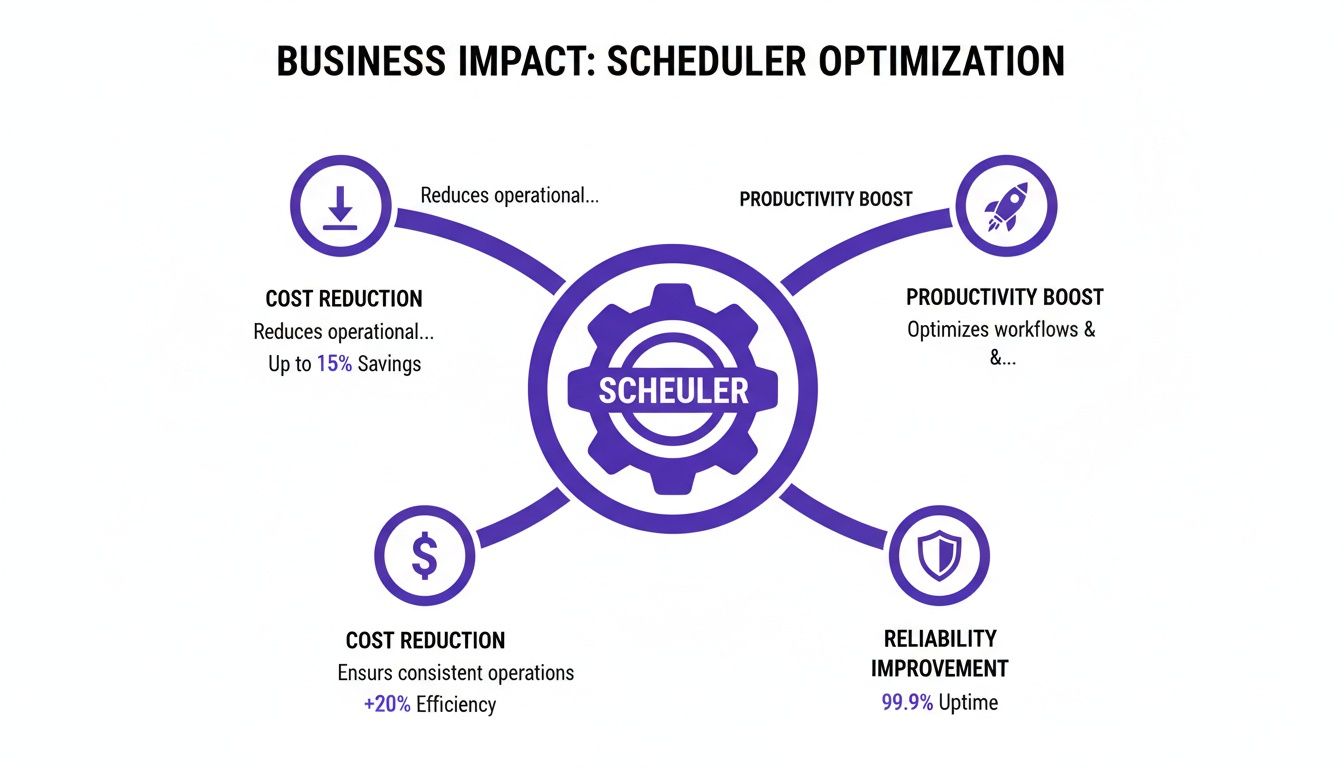
The scheduler's primary function is to balance these three areas, ensuring that each resource allocation decision supports broader business objectives.
Starting with Rule-Based Schedulers
The most fundamental type of dynamic scheduling is rule-based. This system operates on simple "if-then" logic. An administrator configures static rules that trigger actions when specific conditions are met.
For example, a CPU threshold rule might be: "If the average CPU utilization across the cluster exceeds 80% for five consecutive minutes, launch a new compute node." This represents a significant improvement over purely static allocation by introducing basic automated responses.
However, rule-based systems are reactive. They act only after a threshold has been crossed, resulting in a time lag. For applications with sudden demand spikes, this delay can cause performance degradation before the system can adjust.
Predictive Scheduling with Machine Learning
To anticipate resource needs, schedulers can use predictive scheduling powered by machine learning (ML). Instead of reacting to current conditions, these schedulers analyze historical data to forecast future resource requirements.
An ML-driven scheduler might identify that an analytics platform experiences peak load every Monday at 9 AM. Based on this learned pattern, it can proactively scale up resources at 8:45 AM, ensuring capacity is available before the demand arrives.
This predictive approach offers several benefits:
- Smoother Performance: Applications remain responsive as resources are pre-provisioned.
- Improved Efficiency: It prevents the inefficient scramble to add capacity while the system is already under strain.
- Better Cost Management: By forecasting both peaks and troughs, it can also scale down resources effectively, reducing waste during low-traffic periods.
To understand how predictive models fit into a larger system, you can learn more about modern AI and ML orchestration platforms.
Advanced Adaptation with Reinforcement Learning
The most advanced dynamic schedulers utilize reinforcement learning (RL). While a rule-based scheduler follows a fixed script and an ML scheduler learns from past data, an RL scheduler learns by interacting with the live environment in real time.
An RL agent operates like a player in a game, where the "game" is the infrastructure and the "score" is a combination of performance metrics like low latency and low cost. The agent continuously experiments with different actions—such as moving a workload or resizing a resource pool—and observes the results.
An RL-based scheduler does not require historical data to begin learning. It adapts its policies in real-time as workload patterns change. For instance, it might discover that a specific microservice performs better on a certain instance type, a detail that is difficult for a human to identify.
This continuous learning cycle makes RL-based schedulers highly effective for complex, dynamic environments, such as those running large-scale AI training models or thousands of microservices. They can optimize for multiple objectives simultaneously, finding a balance between cost, performance, and reliability that is specific to your system.
Comparison of Scheduling Algorithm Approaches
The appropriate scheduling algorithm depends on your workloads, performance targets, and operational complexity. This table summarizes the key differences.
| Algorithm Type | Core Mechanism | Best For | Key Trade-off |
|---|---|---|---|
| Rule-Based | Responds to predefined "if-then" conditions and thresholds. | Predictable workloads with known performance boundaries and simple scaling needs. | Purely reactive; can't anticipate demand, leading to performance lags. |
| Predictive (ML) | Analyzes historical data to forecast future demand and pre-provision resources. | Environments with cyclical or recurring patterns (e.g., daily traffic peaks). | Ineffective against novel or unexpected events not present in historical data. |
| Reinforcement Learning (RL) | Learns optimal actions through real-time trial and error within the live environment. | Highly dynamic, complex systems with shifting priorities (e.g., microservices, AI). | Higher operational complexity and a "learning" period to become effective. |
Transitioning from rule-based to adaptive, learning-based schedulers enables a closer alignment between resource supply and actual demand, unlocking a level of efficiency not possible with static or reactive systems.
Putting Dynamic Scheduling into Practice
Understanding how a dynamic resource scheduler operates in real-world scenarios clarifies its value. Applying these algorithms to actual workloads demonstrates clear cost savings and performance improvements. The use cases are not limited to technology fields but also include enterprise-scale computing in various industries.
A dynamic scheduler is a tool for optimizing expensive and mission-critical operations.
Optimizing AI and Machine Learning Workloads
Training a large machine learning model is a resource-intensive process, often requiring sustained access to expensive hardware like high-end GPUs. Statically allocating these resources is inefficient.
A dynamic resource scheduler changes this process. For a team of data scientists training multiple models, the scheduler manages a shared pool of GPUs, allocating them to active jobs based on immediate needs.
When a training job completes, the scheduler immediately reclaims the GPUs and assigns them to the next job in the queue. This action eliminates idle time for expensive hardware, which can result in significant daily cost savings in a busy MLOps pipeline. For teams managing complex AI systems, platforms like https://dsg.ai/manageai can help govern these workflows.
A Synthetic E-commerce Example
Consider an online retailer preparing for a holiday sales event. The company's recommendation engine is critical for sales, but its traffic is highly variable.
Using a dynamic scheduler, the retailer can implement a predictive scaling policy:
- Baseline Operation: During normal periods, the recommendation engine runs on a minimal number of compute instances to control costs.
- Peak Scaling: As the holiday season approaches, the scheduler's predictive model, trained on previous years' sales data, proactively adds infrastructure.
- Real-time Adjustment: During the sale, the scheduler continuously adjusts the number of instances based on live user traffic to maintain site performance.
- Scale-Down: After the sale, the scheduler automatically scales infrastructure back to the baseline.
(Note: This is a synthetic example to illustrate functionality.) By matching resources to demand, the company could achieve an estimated 40% reduction in compute costs for this specific workload while ensuring a positive customer experience. For more on how AI-powered tools are boosting productivity, you can see examples like Reclaim AI and Leavewizard: A Match Made in Scheduling Heaven.
Managing Enterprise Batch Processing
A financial services firm runs large batch processing jobs nightly to calculate risk and generate reports. These jobs must be completed by a deadline but do not need to run during peak-cost hours.
A dynamic resource scheduler can be configured to optimize for cost. It identifies the most opportune moments to run these jobs, prioritizing the use of discounted spot instances in the cloud.
The scheduler's task is to balance cost reduction with timely job completion. If a spot instance is reclaimed by the cloud provider, the scheduler automatically reschedules that portion of the workload on another available machine without human intervention. This strategy significantly lowers the cost of essential back-office operations.
This move toward intelligent automation is reflected in market data. The global workload scheduling and automation market was valued at USD 2.22 billion in 2019 and is projected to reach USD 3.65 billion by 2027, according to a 2020 report by Verified Market Research. This growth is driven by the need for smarter tools to manage large data volumes and complex workloads.
What to Look for in an Enterprise-Ready Scheduler
Implementing a dynamic resource scheduler is a strategic decision that involves entrusting control of mission-critical workloads to an automated platform. The chosen system must be designed for enterprise-level demands, integrating with the existing technology ecosystem and demonstrating reliability.
Without essential foundational features, a scheduler can create more problems than it solves. This section provides a checklist of necessary features for a successful, secure, and scalable implementation.
Seamless Integration and Ecosystem Compatibility
A dynamic resource scheduler must integrate with existing tools and platforms. An enterprise-grade scheduler should be able to connect to your current infrastructure without requiring a complete overhaul.
This means it should support:
- Container Orchestrators: Native integration with Kubernetes is essential. The scheduler must be able to manage pods and nodes directly.
- Virtualization Platforms: It should be compatible with systems like VMware to manage both containerized and legacy applications under a unified strategy.
- Cloud Provider APIs: The scheduler must be able to communicate with the APIs of major cloud providers—AWS, Azure, and GCP—to provision and de-provision resources like virtual machines and storage on demand.
A scheduler that requires a re-architecture of core infrastructure is not a practical solution. An enterprise-ready tool should adapt to your environment, not the other way around, delivering value without causing significant disruption.
Comprehensive Visibility and Governance
Effective management requires visibility. A powerful scheduler makes thousands of automated decisions, and teams need clear insight into its operations. Robust dashboards and reporting tools are critical for translating resource allocations into business impact.
Look for a solution that provides:
- Resource Usage Dashboards: Real-time visibility into CPU, memory, and GPU utilization across all clusters and applications.
- Scheduling Decision Logs: An audit trail explaining why the scheduler made a specific decision, which is vital for debugging and building trust in the automation.
- Cost Attribution Reporting: The ability to analyze cloud costs by team, project, or application, directly linking scheduling decisions to expenditures.
This level of transparency builds confidence in the system and helps demonstrate its return on investment. According to a 2023 report from Custom Market Insights on the related market of advanced planning and scheduling, U.S. manufacturers have seen 25-30% reductions in inventory and 15% gains in throughput using similar principles of intelligent automation. You can read more about the growth and impact of advanced scheduling software to see the potential.
Enterprise-Grade Scalability, Reliability, and Security
The scheduler itself must be architected for enterprise use. This includes its core algorithm and its ability to function in a large-scale, continuously operating environment.
Key factors to evaluate include:
- Massive Scalability: The system must be proven to handle thousands of nodes and tens of thousands of concurrent workloads. Request performance benchmarks.
- High Availability (HA): It must be designed to eliminate single points of failure, ensuring continuous operation even if one of its components fails.
- Robust Security Controls: The platform should support policy-based controls, role-based access control (RBAC), and integration with corporate identity providers. This is necessary for aligning scheduling rules with internal security policies and external compliance frameworks like SOC 2 or HIPAA.
Your Roadmap to Implementing a Scheduler
Adopting a dynamic resource scheduler is a phased process designed to build confidence, demonstrate value, and minimize disruption. This three-step roadmap provides a clear path from initial assessment to full-scale optimization.
The first step is to establish a baseline for measurement.
Phase 1: Audit and Baseline
Before making changes, create a clear picture of your current performance and costs. Map your resource landscape to identify inefficiencies. Use monitoring tools to track metrics like CPU and memory utilization, idle capacity, and application response times over a representative business cycle.
The goal is to answer these questions:
- Where are resources consistently over-provisioned?
- Which applications experience performance degradation during demand spikes?
- What is the total cost of our idle cloud infrastructure?
This data becomes the benchmark against which the scheduler's impact will be measured.
Phase 2: Launch a Pilot Program
With a baseline established, conduct a controlled test. Select a single, non-critical application—ideally one with unpredictable demand or known inefficiencies—and allow the dynamic scheduler to manage it.
A pilot program in a controlled environment is an effective way to measure initial ROI. It allows you to validate the scheduler's performance and adjust its configuration without risking core business operations.
During this phase, it is common for teams to observe a 10 to 15 percent reduction in resource consumption for the pilot application, often within the first 60 days. Some platforms, like DSG.AI, offer a "recommendation mode" where the scheduler suggests optimizations without implementing them. This is an effective way to build trust and understand the scheduler's logic.
Phase 3: Scale and Refine
Once the pilot program has demonstrated value, begin a broader rollout. A sound strategy is to expand the scheduler to adjacent services with similar workload patterns. This incremental approach allows you to apply learnings from the pilot to new situations.
The key to this phase is continuous refinement. Use performance data as a feedback loop. As you scale, monitor the scheduler’s decisions and their impact on costs and application performance. This ongoing process ensures your resource strategy evolves with your business.
A phased approach breaks a large project into manageable, value-driven steps. To see how DSG.AI's platform can support this journey, explore our ZeroFlow implementation framework.
Frequently Asked Questions
When considering a new technology like dynamic scheduling, technical leaders often have questions about its implementation and impact. Here are answers to some common inquiries.
How Is This Different From The Default Kubernetes Scheduler?
The default Kubernetes scheduler is responsible for initial pod placement. When a new pod is created, it finds a suitable node to run it on. Once the pod is placed, the default scheduler's main task is complete.
A dynamic resource scheduler provides continuous optimization. It not only places new workloads but also actively manages running workloads by moving them, resizing their resource allocations, and scaling nodes up or down to maintain efficiency and performance over time. It operates throughout the entire workload lifecycle, not just at the beginning.
What Is The Typical Timeframe To See a Return On Investment?
Initial cost savings are often visible within the first 3 to 6 months. Based on our experience, pilot programs targeting a single, high-cost service can achieve a 15-25% reduction in cloud spend for that specific workload.
The full ROI, which includes gains from automation, improved performance, and increased engineer productivity, typically becomes apparent over a 6 to 12-month period as the scheduler's scope expands across the environment.
Is Implementing a Dynamic Resource Scheduler a Disruptive Process?
No, modern schedulers are designed for non-disruptive integration. The process usually involves deploying a lightweight agent to your cluster, which requires minimal, if any, changes to existing deployment pipelines or developer workflows.
A common starting point is a "recommendation-only mode." In this mode, the scheduler analyzes workloads and suggests optimizations without making any changes. This allows your team to review the logic, validate the recommendations, and build trust in the system before enabling full automation.
This phased approach mitigates risk and allows teams to become comfortable with the scheduler's operations.
At DSG.AI, we specialize in helping companies build and run AI systems that deliver real-world results. To see how our architecture-first approach can help you turn data into a true competitive advantage, take a look at our work at https://www.dsg.ai/projects.