Written by:
Editorial Team
Editorial Team
ERP system integration is the process of connecting a company's core Enterprise Resource Planning (ERP) software with all other business applications. This connection creates a reliable flow of information, transforming the ERP from a data repository into the operational hub of the organization.
The primary goal is to establish a single source of truth for all business data.
Why ERP System Integration Is a Strategic Imperative
An ERP system manages core business functions like finance and supply chain. Its full potential is realized when it communicates with other applications in a company's technology stack. Without this communication, departments operate with separate, disconnected data. This creates operational friction and business risk.
When systems are not integrated, employees must manually copy data from one application to another. This process is slow and introduces errors. For example, a synthetic case study shows an inventory miscount in a standalone warehouse system can lead to stockouts or overstocking, which can reduce revenue by 5% to 10%. Compiling a consolidated financial report by manually reconciling data from three different systems is inefficient and increases the risk of compliance issues.
The Dangers of a Disconnected Ecosystem
A fragmented technology stack creates data silos, making it difficult to get a complete view of business performance.
Challenges in a non-integrated environment include:
- Poor Data Visibility: Leadership cannot get a clear, real-time view of business health because critical data is stored in separate applications.
- Operational Delays: Manual tasks, such as re-entering sales orders from a CRM into the ERP, slow down processes like the order-to-cash cycle.
- Inconsistent Customer Experience: When sales, service, and logistics systems do not share information, customers may experience disjointed service.
The objective of ERP integration is to transform a collection of separate applications into a unified system. It replaces manual processes and data silos with automated workflows and a comprehensive view of operations.
ERP integration helps build a foundation for business growth and adaptation. It provides the operational structure needed to scale operations, improve process control, and achieve measurable results.
The following table illustrates the shift from isolated functions to a unified system.
Core Business Functions Impacted by ERP Integration
| Business Function | Before Integration (Siloed State) | After Integration (Unified State) |
|---|---|---|
| Finance & Accounting | Manual data reconciliation, delayed closing periods, high risk of errors. | Automated financial consolidation, real-time reporting, enhanced compliance. |
| Sales & CRM | Inaccurate quotes, poor visibility into inventory, disjointed customer data. | Accurate pricing, real-time stock availability, complete 360-degree customer view. |
| Supply Chain & Inventory | Inefficient procurement, risk of stockouts/overstock, manual order processing. | Optimized inventory levels, automated reordering, streamlined order-to-cash cycle. |
| Human Resources | Disconnected payroll and employee data, complex onboarding processes. | Unified employee records, streamlined payroll, simplified benefits administration. |
| Manufacturing | Disconnected production schedules and material planning, poor shop floor visibility. | Synchronized production planning, real-time material requirements, improved efficiency. |
Connecting these systems moves the organization from a reactive, fragmented state to a proactive, cohesive one.
A Foundation for Growth and Scalability
This transition is becoming standard practice. According to Eurostat, 43.3% of EU enterprises used ERP systems as of 2023. Adoption rates were 37.9% in small businesses and 86.3% in large enterprises, indicating that ERPs are important for scaling.
The strategic focus on ERP system integration covers high-level strategy and technical details, such as a Microsoft Dynamics Integration. By linking these platforms, companies build a scalable foundation that supports growth, improves operational control, and delivers a return on investment.
Selecting the Right ERP Integration Architecture
Choosing the right ERP integration architecture is a critical decision that defines how systems communicate and how easily the business can adapt to future changes. It is the blueprint for a connected enterprise.
This decision dictates how systems connect today and how easily new applications can be added or operations scaled in the future. The main architectural patterns are outlined below.
1. Point-to-Point Integration
Point-to-point integration is a direct connection between two applications. This approach is simple and effective for a single pair of systems.
However, as the number of systems increases, the number of connections grows exponentially. Connecting five applications requires ten individual connections, creating a complex and difficult-to-manage network. This model is generally suitable only for small businesses with a few systems to synchronize.
2. Middleware and the Enterprise Service Bus (ESB)
To avoid the complexity of point-to-point connections, many organizations use middleware, such as an Enterprise Service Bus (ESB). An ESB acts as a central hub for communication.
Each application connects once to the ESB, which then manages message routing, data transformation, and protocol conversion between systems. This hub-and-spoke model simplifies management and makes it easier to add or replace applications without disrupting the entire network. ESBs are a proven solution for complex, on-premise environments requiring high control.
The decision tree below illustrates the evolution from disconnected systems to an integrated enterprise.
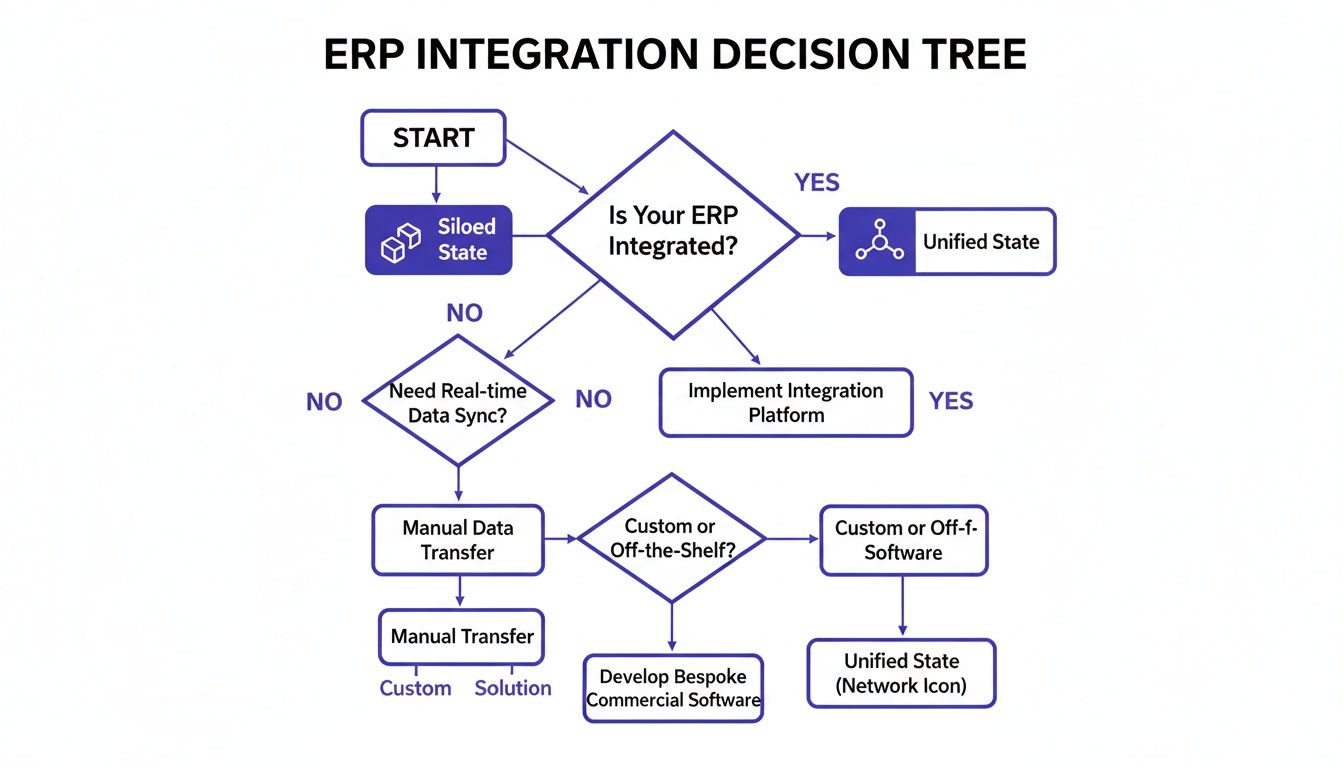
This visual shows the choice between maintaining siloed data and building a unified enterprise where information flows freely.
3. Integration Platform as a Service (iPaaS)
With the shift to cloud computing, Integration Platform as a Service (iPaaS) has become a common solution. An iPaaS is a cloud-hosted ESB delivered as a subscription service. These platforms include pre-built connectors, data mapping tools, and workflow automation features that can accelerate integration projects.
Using an iPaaS offloads the management of integration infrastructure. This allows the IT team to focus on business logic rather than server maintenance.
This model is suitable for cloud-first companies connecting a mix of SaaS applications (like Salesforce) and on-premise systems. The global ERP market is projected to grow from $106.22 billion in 2026 to $281.58 billion by 2034. According to Fortune Business Insights, the cloud ERP segment is expected to reach $140 billion by 2030.
4. API-Led Connectivity
This strategy treats Application Programming Interfaces (APIs) as reusable, managed products organized into three layers:
- System APIs: Securely unlock data from core systems like an ERP or legacy database.
- Process APIs: Combine data from System APIs into business processes, such as "order fulfillment."
- Experience APIs: Deliver data and processes to end-user applications, like a mobile app.
This layered approach promotes reuse and agility, reducing IT bottlenecks.
5. Event-Driven Architecture (EDA)
In an Event-Driven Architecture (EDA), systems communicate by producing and consuming "events." For example, when an order is placed, the e-commerce platform publishes an "Order Created" event.
Other systems, such as inventory and billing, subscribe to this event and react accordingly. This decouples the systems, meaning one can be changed without affecting others. EDA is suitable for building responsive, real-time, and scalable applications.
Executing EDA often requires tools for business process and data orchestration. You can learn more about data orchestration and its role in modern architectures.
Comparison of ERP Integration Patterns
The right architecture depends on a company's specific context, including its IT landscape, budget, team skills, and business goals. The table below compares the five patterns across key criteria.
| Integration Pattern | Best For | Scalability | Maintenance Overhead | Relative Cost |
|---|---|---|---|---|
| Point-to-Point | Simple integrations between 2-3 systems. | Poor | Very High (at scale) | Low (initially) |
| Middleware/ESB | Complex, on-premise environments with many legacy systems. | Good | High | High |
| iPaaS | Hybrid cloud/on-premise environments; rapid integration needs. | Excellent | Low | Medium (Subscription) |
| API-Led | Building a reusable, agile application network. | Excellent | Medium | High (initially) |
| Event-Driven | Real-time, highly scalable, and decoupled systems. | Excellent | Medium | Medium to High |
There is no single "best" architecture. Some organizations use a hybrid approach, combining an ESB for core legacy systems with an iPaaS for cloud applications. The key is to make an informed choice that aligns with the business's direction.
Building Your Master Data Management Framework
A well-designed integration architecture defines how systems communicate. However, if the data flowing between those systems is inconsistent or contains errors, the integration will be ineffective.
Master Data Management (MDM) is the process of creating a single, authoritative “golden record” for critical business data, such as customers, products, and vendors. Without MDM, a business operates with a fractured and unreliable view of its data.

The Real Cost of Inconsistent Data
Poor MDM has tangible consequences. For example, a customer, "ABC Corp," might exist in three different forms across a company's tech stack:
- "ABC Corporation" in the ERP
- "ABC Co." in the CRM
- "A.B.C. Inc." in the service platform
This inconsistency can cause significant problems. The sales team may not have a complete view of the customer's service history. The finance team may struggle to consolidate billing. Analytics on customer lifetime value will be skewed. Multiplying this issue by thousands of customers and products highlights the scale of the problem.
A strong Master Data Management framework ensures data trustworthiness. It guarantees that when the ERP asks, "Who is our biggest customer?" every connected system provides the same correct answer.
Creating this single source of truth requires a strategic effort involving clear governance and ownership.
A Practical Framework for MDM Success
Implementing an MDM program involves building processes and assigning responsibilities to maintain data quality. A successful framework includes these key components:
-
Identify Critical Data Domains: Start by identifying the most vital data entities for operations. For most companies, these are Customer, Product, Vendor, and Employee. Focusing initial efforts here can yield the greatest impact.
-
Define Data Stewardship Roles: Assign data stewards for each domain. These individuals or teams are responsible for setting data standards, resolving quality issues, and approving changes to master records.
-
Establish Governance Policies: Create documented policies for how data is created, maintained, and used. These policies should define required fields, validation rules, and the process for handling duplicates or conflicting information.
This structure helps transform data management from a reactive process into a proactive, controlled discipline.
From Different Schemas to a Single Truth
A major challenge in integration is reconciling different data formats between systems. For example, a CRM might store a customer's address in a single text field, while the ERP separates it into Street, City, State, ZIP, and Country.
Data mapping is the process of translating data from a source schema to a target schema while preserving its meaning and integrity.
Effective data mapping is the final step in creating a reliable flow of information. By defining authoritative master records and mapping all other systems to that single source, a company builds the foundation for accurate analytics and confident decision-making.
Weaving Security and Compliance into Your Integration
Integrating an ERP system expands a company's digital footprint, and each new connection point is a potential security threat. Security should be built into the integration from the start, following a 'security-by-design' approach.
This means protecting data throughout its lifecycle. When a sales order moves from a CRM to the ERP and then to a logistics platform, the data must be secure at every step. This requires a multi-layered strategy that governs access, protects data in transit, and provides auditable proof of security.
The Core of a Secure Integration
A secure ERP integration relies on several foundational pillars that work together to create a defense-in-depth strategy, reducing the risk of a breach or unauthorized access.
- Identity and Access Management (IAM): This enforces the principle of least privilege, ensuring users and systems can only access the data they need to perform their functions. For example, an accounts payable employee should not have access to sensitive HR files.
- End-to-End Data Encryption: Data is vulnerable both at rest (in a database) and in transit (moving between applications). Strong encryption is necessary for both states to scramble information and make it unreadable without the correct decryption keys.
- Secure API Management: APIs act as gatekeepers to ERP data. Proper API security involves using authentication tokens to verify requests, implementing rate limiting to prevent denial-of-service attacks, and maintaining detailed logs of all API activity.
A secure integration not only defends against external attacks but also creates auditable controls for proving compliance to regulators. It engineers a system that is both resilient and reliable.
Staying on the Right Side of Regulations
Governance, risk, and compliance (GRC) obligations apply to data throughout its entire journey. Regulations like GDPR, SOX, and HIPAA apply not just to data within the ERP but to data moving between all connected systems. A compliant integration must provide a clear audit trail showing who accessed data, what changes were made, and where it was shared.
Regional rules add complexity. For example, UAE E-Invoicing requirements mandate that ERP integrations connect directly with local tax frameworks. The integration architecture must be adaptable to such evolving regulations.
This governance also includes managing third-party tools. Our guide on Third-Party Risk Management (TPRM) provides resources for building a secure vendor ecosystem. A proactive approach to GRC makes compliance a structured, manageable part of operations.
Laying Out a Phased Integration Roadmap
An ERP integration is a large project that requires a deliberate, methodical approach. Trying to complete it all at once can lead to scope creep, budget overruns, and missed deadlines.
Breaking the project into distinct phases provides control, creates evaluation checkpoints, and increases the chances of success. This roadmap guides the team from a high-level concept to a stable, working system that delivers value at each stage.
Phase 1: Discovery and Planning
This initial phase focuses on defining what will be built and why. The technical effort is anchored to tangible business goals.
Activities in this stage include:
- Stakeholder Workshops: Involve representatives from finance, operations, sales, and IT to define business requirements and success criteria.
- System Audits: Conduct a thorough review of existing applications, data sources, and current integrations to map the "before" state.
- Scope Definition: Create a detailed project charter that outlines clear boundaries, objectives, timelines, and budget constraints.
The output of this phase is a comprehensive project plan approved by all stakeholders.
Phase 2: Design and Architecture
This phase translates business needs into a detailed technical schematic. Key decisions are made about integration patterns, data models, and security protocols.
The technical team creates detailed diagrams that map every data flow, API endpoint, and transformation rule. The design aims for a solution that is scalable, secure, and maintainable. The final output is a complete technical design specification for the development team.
Phase 3: Development and Testing
In this phase, the architectural blueprint is turned into a functioning system. Developers build the connectors, APIs, and workflows defined in the design phase.
Rigorous testing is crucial to a successful launch.
A robust testing strategy is the best defense against post-launch issues. It integrates quality control into the development process.
Testing should be done in layers:
- Unit Testing: Developers test individual components in isolation.
- Integration Testing: Components are connected to verify that data flows correctly between systems.
- User Acceptance Testing (UAT): Business users test the system to confirm it meets their needs and works for their daily tasks.
- Performance Testing: The system is subjected to heavy transaction loads to ensure it can handle real-world pressure.
Phase 4: Deployment and Change Management
"Go-live" is when the new integration is moved into the production environment. A phased rollout—such as a pilot with a small user group or deployment by business unit—is recommended to minimize risk.
A strong change management plan is also necessary. This includes user training, clear documentation, and a dedicated support system. Without preparing employees for the change, the project is at risk. According to these ERP implementation statistics, 50% of ERP implementations fail on the first attempt, projects often run 30% longer than planned, and 51% of companies experience major operational disruptions at go-live, often due to a lack of user readiness.
Phase 5: Post-Go-Live Monitoring and Optimization
The project continues after go-live. During the Post-Go-Live Monitoring phase, the project team monitors system performance, error logs, and data accuracy to address any issues promptly.
This is also the time to collect user feedback and track the key performance indicators (KPIs) defined in the planning phase. This data helps prove the project's business value and identify opportunities for improvement.
Measuring Success and Preparing for AI Integration
After the project is complete, it is important to measure its success. Proving the value of an ERP system integration means focusing on business outcomes, not just technical metrics like system uptime.
Success is measured against the Key Performance Indicators (KPIs) defined in the planning stage. If the initial goals were not clear, it will be difficult to demonstrate the project's worth.
Defining Your Business-Centric KPIs
KPIs should be directly tied to the operational issues that the integration was intended to solve. This helps demonstrate the return on investment to leadership, finance, and operations.
Examples of outcome-driven KPIs include:
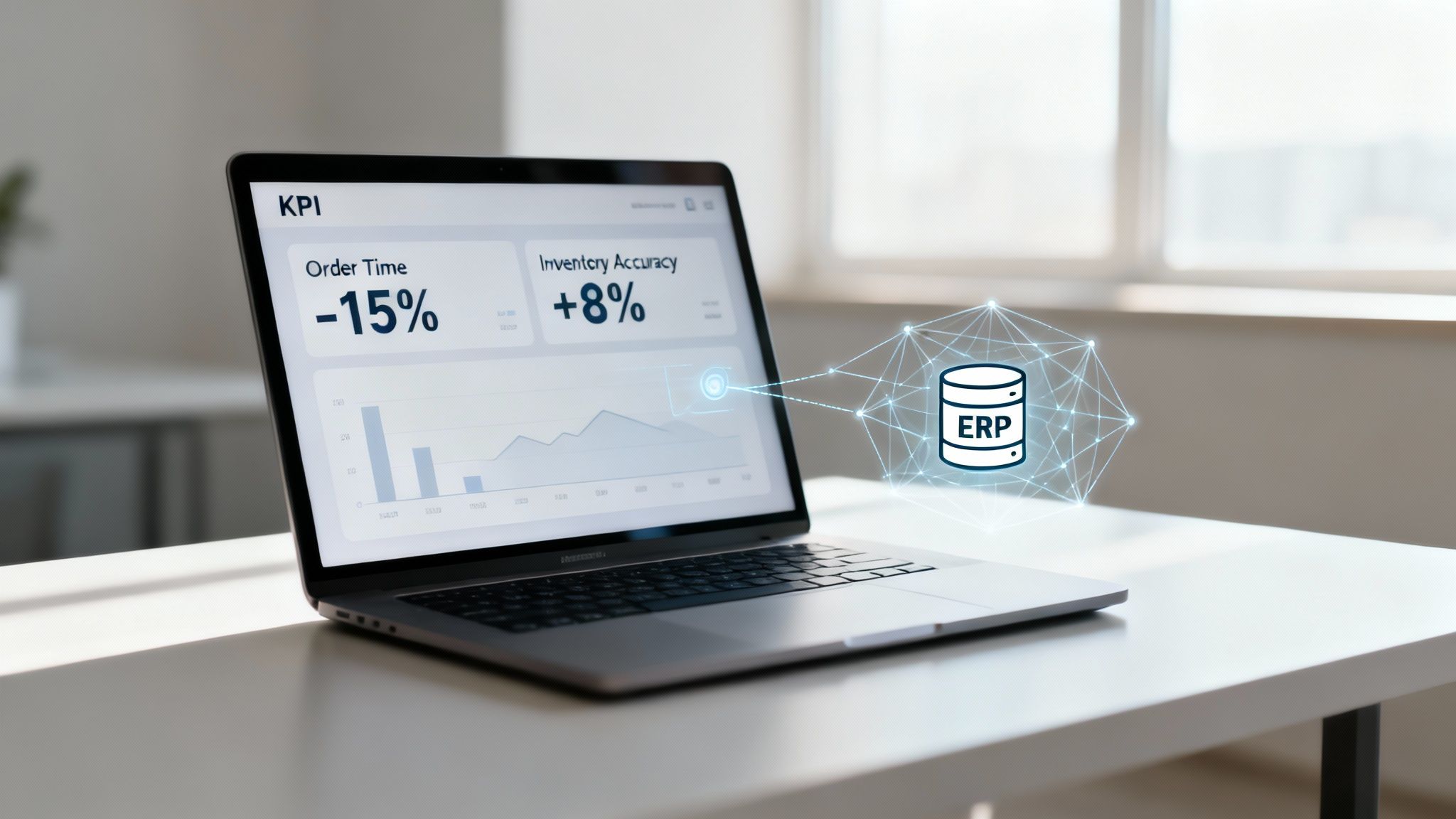
- Order-to-Cash Cycle Time: Achieve a 15% reduction in the average time from order placement to payment receipt, measured within six months post-launch.
- Inventory Accuracy: Increase inventory accuracy from a baseline of 91% to 99% by eliminating manual data entry between the warehouse management system and the ERP.
- Financial Close Process: Reduce the monthly financial close from eight business days to five by automating data consolidation from subsidiary systems.
These metrics translate a complex IT project into clear business wins, showing how unified data reduces costs, accelerates revenue, and improves operational control.
Tracking these KPIs provides the evidence needed to justify the project's cost and gain support for future initiatives.
From a Solid Foundation to AI-Powered Insights
A successful ERP integration prepares a company for the future, particularly for Artificial Intelligence and Machine Learning. An AI model is only as effective as the data it is trained on. Feeding it inconsistent, siloed data will produce unreliable results, following the "garbage in, garbage out" principle.
An integrated ERP serving as the single source of truth provides a clean, reliable, and large dataset. This data can power advanced analytics and AI, offering a competitive advantage.
Practical applications include:
- Demand Forecasting: AI can analyze real-time sales, inventory, and supply chain data to predict customer demand with greater accuracy than manual methods.
- Predictive Maintenance: An ML model can analyze data from factory equipment to predict failures before they occur, preventing costly downtime.
- Intelligent Automation: With trustworthy data, AI can automate complex tasks like invoice matching or purchase order approval, performing them faster and more accurately than humans.
Connecting integration work to these future goals positions it as a strategic investment in becoming a data-driven organization. Managing these new opportunities is a discipline, and we have shared our thoughts on how to manage your AI portfolio to align these initiatives with business goals.
Common ERP System Integration Questions
An ERP integration project will inevitably raise questions from stakeholders. Addressing these concerns directly helps keep the project on track.
Here are some common questions from business and technical leaders, along with straightforward answers.
What Is the Biggest Mistake in ERP Integration?
The most significant mistake is treating integration as solely an IT task. It is a business initiative. When this is overlooked, projects often fail to deliver their intended value.
This narrow focus leads to teams connecting systems without understanding the business problems they are solving. Successful integrations are anchored in a solid business case with clear goals and have buy-in from departments like finance, operations, and sales from the start.
Should We Choose a Single-Vendor Suite or a Best-of-Breed Approach?
A single-vendor suite offers pre-integrated components but may require compromises on specific features. A best-of-breed strategy allows a company to select the best tool for each function—such as Salesforce for CRM—but requires a more sophisticated integration plan.
There is no single correct answer, and most large companies use a hybrid model. This makes a flexible, well-designed integration architecture essential.
How Do We Integrate with Legacy On-Premise Systems?
Connecting modern cloud ERPs to legacy on-premise systems is a common challenge. API-led connectivity is often the most effective approach.
This involves "wrapping" the legacy application in a modern API. This allows new cloud tools to communicate with it using a standard protocol, without requiring an immediate replacement of the old system. This contains the complexity and simplifies future migration.
How Much Should We Budget for Integration?
A general guideline is to allocate 20% to 40% of the total ERP implementation budget for integration. This should cover the integration platform, developer time, and extensive testing.
In highly complex environments with numerous systems, this percentage can be higher. It is important to budget for erp system integration deliberately and not treat it as a minor expense in the core ERP license fee. Planning for it upfront can prevent financial issues later.
At DSG.AI, we specialize in designing and building enterprise-grade AI systems that deliver measurable value. Our architecture-first approach ensures your AI solutions integrate seamlessly with your core business systems, turning your data into a true competitive advantage. Discover how we can help you build, deploy, and operationalize AI at scale by exploring our past projects.